

WordPress PostViews 插件设置本周热门文章、本月热门文章的教程(自定义某个时间段的热门文章)。其实,自从吾乐吧软件站使用WP-PostViews插件以来,就很想设置“本周热门文章”,但是WP-PostViews插件自从1.2版本之后,就取消了这个功能。由于本人比较懒,所以很长一段时间都没去理会这个问题。
随着时间的推移,热门文章访问次数逐渐增加,但是来来去去,侧边栏显示的热门文章永远都是那几篇。为啥?你自己想……前两天,我在网上找了资料,按照网上公布的方法:将1.2版本里面的get_timespan_most_viewed()函数增加到主题目录下的functions.php文件中(也可以增加到p-postviews.php文件中,随你喜欢),设置完毕之后,在sidebar.php文件里面调用get_timespan_most_viewed()。
本人按照以上方法设置后,确实生效了。热门文章终于出来了。我很高兴!但是,今天我去访问自己的网站的时候,发现了3个异常(你们遇到的问题未必和我相同):
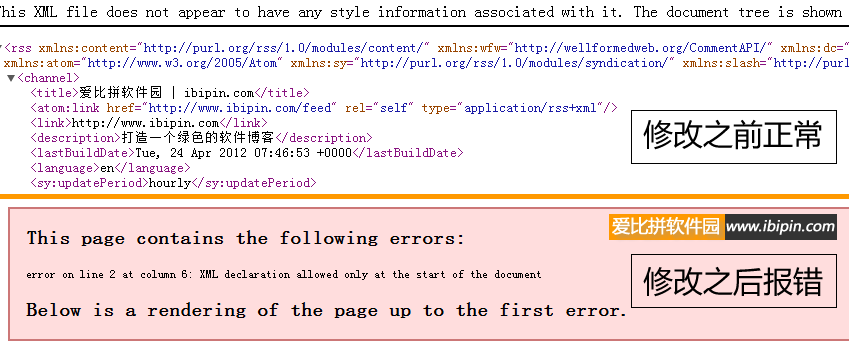
1、发现 RSS 订阅的页面 https://www.wuleba.com/feed 出错了:
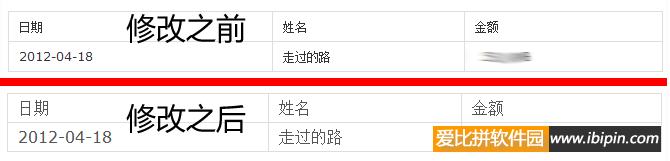
2、Table字体变了:
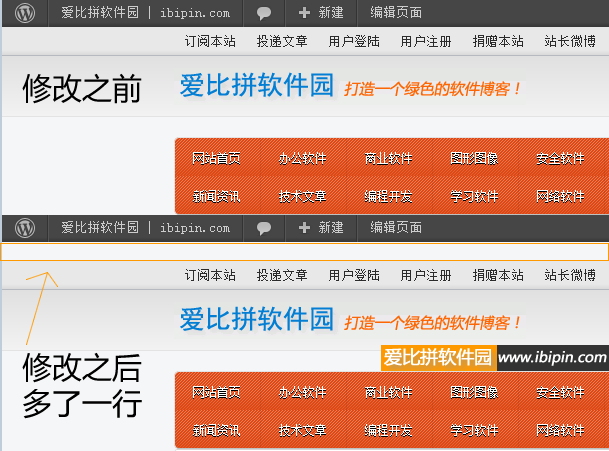
3、用户登录之后,顶部 adminbar 下方多了一个空行:
以上是本人使用网上现有的那些解决方案,所产生的一些问题,现在开始讲讲解决方法。参考了1.2的get_timespan_most_viewed()与1.6的get_most_viewed()之后,得出以下解决方法:
1、找到插件目录下的 wp-postviews.php 文件,找到:
|
2 3 4 5 6 7 8 9 10 11 12 13 14 15 16 17 18 19 20 21 22 23 24 25 26 27 28 29 30 31 32 33 34 35 36 37 38 39 40 |
### Function: Display Most Viewed Page/Post
if(!function_exists(‘get_most_viewed’)) { function get_most_viewed($mode = ”, $limit = 10, $chars = 0, $display = true) { global $wpdb; $views_options = get_option(‘views_options’); $where = ”; $temp = ”; $output = ”; if(!empty($mode) && $mode != ‘both’) { $where = “post_type = ‘$mode'”; } else { $where = ‘1=1’; } $most_viewed = $wpdb->get_results(“SELECT DISTINCT $wpdb->posts.*, (meta_value+0) AS views FROM $wpdb->posts LEFT JOIN $wpdb->postmeta ON $wpdb->postmeta.post_id = $wpdb->posts.ID WHERE post_date < ‘”.current_time(‘mysql’).“‘ AND $where AND post_status = ‘publish’ AND meta_key = ‘views’ AND post_password = ” ORDER BY views DESC LIMIT $limit”); if($most_viewed) { foreach ($most_viewed as $post) { $post_views = intval($post->views); $post_title = get_the_title($post); if($chars > 0) { $post_title = snippet_text($post_title, $chars); } $post_excerpt = views_post_excerpt($post->post_excerpt, $post->post_content, $post->post_password, $chars); $temp = stripslashes($views_options[‘most_viewed_template’]); $temp = str_replace(“%VIEW_COUNT%”, number_format_i18n($post_views), $temp); $temp = str_replace(“%POST_TITLE%”, $post_title, $temp); $temp = str_replace(“%POST_EXCERPT%”, $post_excerpt, $temp); $temp = str_replace(“%POST_CONTENT%”, $post->post_content, $temp); $temp = str_replace(“%POST_URL%”, get_permalink($post), $temp); $output .= $temp; } } else { $output = ‘<li>’.__(‘N/A’, ‘wp-postviews’).‘</li>’.“\n”; } if($display) { echo $output; } else { return $output; } } } |
2、把上面这小段代码修改为这个:
|
2 3 4 5 6 7 8 9 10 11 12 13 14 15 16 17 18 19 20 21 22 23 24 25 26 27 28 29 30 31 32 33 34 35 36 37 38 39 40 41 42 43 44 |
### Function: Display Most Viewed Page/Post
if(!function_exists(‘get_most_viewed’)) { function get_most_viewed($mode = ”, $limit = 10, $chars = 0, $display = true) { global $wpdb; //吾乐吧软件站 https://www.wuleba.com $limit_date = current_time(‘timestamp’) – (7*86400); $limit_date = date(“Y-m-d H:i:s”,$limit_date); $views_options = get_option(‘views_options’); $where = ”; $temp = ”; $output = ”; if(!empty($mode) && $mode != ‘both’) { $where = “post_type = ‘$mode'”; } else { $where = ‘1=1’; } //$most_viewed = $wpdb->get_results(“SELECT DISTINCT $wpdb->posts.*, (meta_value+0) AS views FROM $wpdb->posts LEFT JOIN $wpdb->postmeta ON $wpdb->postmeta.post_id = $wpdb->posts.ID WHERE post_date < ‘”.current_time(‘mysql’).”‘ AND $where AND post_status = ‘publish’ AND meta_key = ‘views’ AND post_password = ” ORDER BY views DESC LIMIT $limit”); $most_viewed = $wpdb->get_results(“SELECT DISTINCT $wpdb->posts.*, (meta_value+0) AS views FROM $wpdb->posts LEFT JOIN $wpdb->postmeta ON $wpdb->postmeta.post_id = $wpdb->posts.ID WHERE post_date < ‘”.current_time(‘mysql’).“‘ AND post_date > ‘”.$limit_date.“‘ AND $where AND post_status = ‘publish’ AND meta_key = ‘views’ AND post_password = ” ORDER BY views DESC LIMIT $limit”); if($most_viewed) { foreach ($most_viewed as $post) { $post_views = intval($post->views); $post_title = get_the_title($post); if($chars > 0) { $post_title = snippet_text($post_title, $chars); } $post_excerpt = views_post_excerpt($post->post_excerpt, $post->post_content, $post->post_password, $chars); $temp = stripslashes($views_options[‘most_viewed_template’]); $temp = str_replace(“%VIEW_COUNT%”, number_format_i18n($post_views), $temp); $temp = str_replace(“%POST_TITLE%”, $post_title, $temp); $temp = str_replace(“%POST_EXCERPT%”, $post_excerpt, $temp); $temp = str_replace(“%POST_CONTENT%”, $post->post_content, $temp); $temp = str_replace(“%POST_URL%”, get_permalink($post), $temp); $output .= $temp; } } else { $output = ‘<li>’.__(‘N/A’, ‘wp-postviews’).‘</li>’.“\n”; } if($display) { echo $output; } else { return $output; } } } |
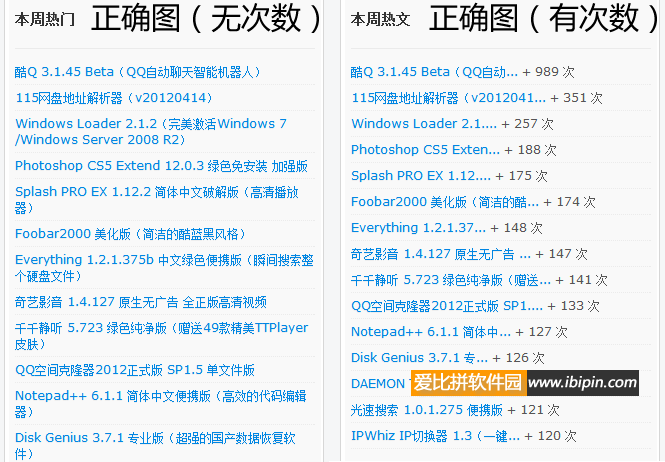
到此为止,就算是修改完毕了。成功之后的预览图:
大家在使用过程中,如果还是有问题,请到吾乐吧软件站留言!好记性不如烂笔头,写下此文,防止自己忘记。2012-04-24
温馨提示:本文发布于较早时期(2018年之前),软件下载地址已经失效,建议您在本站搜索该软件名称获取最新版本。
下载方法:打开链接–输入验证码–打开下载列表–左上角有一个免费用户下载–普通不限速下载。
修改之后的WP-PostViews插件 1.6 下载:
下载地址:城通网盘 |